
Below is a screenshot and brief description showing the different back up options available when backing up video footage that has been recorded locally to the LILIN Navigator software. Please note, these options are different when using the 'Remote DVR/NVR Playback' option in Navigator.
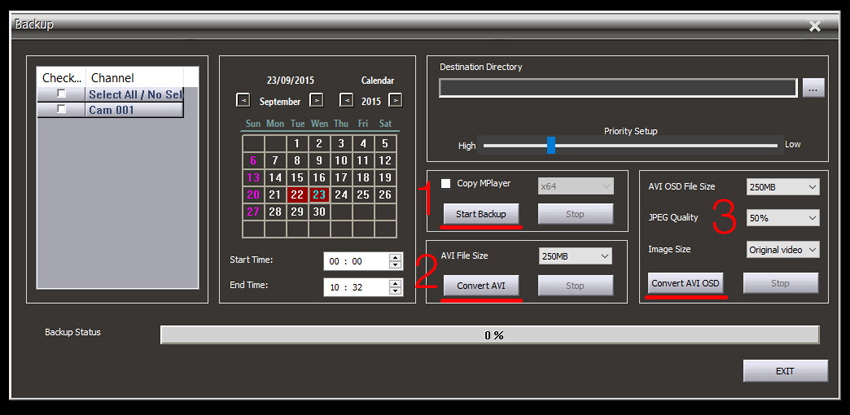
The following options available are:
1) LILIN's Proprietary backup files. (Always ensure the 'Copy Mplayer' option is ticked before proceeding with the backup)
This is the recommended backup type to use. Once downloaded these files are locked so they can not be edited or manipulated in any way. These files are also fully time and date stamped. Multiple backups of different channels can be placed in the same folder location and the MPlayer software will index these files and play them back concurrently on one screen with an option to put each channel in full screen, all dates backed up are also displayed in a handy calendar. AVI files can also be created subsequently if this backup file type is used. This is also the quickest backup method.
2) These files are standard AVI files. Individual files are created for each channel backed up. Each channel can only be played back one at a time using a PC/Mac based program capable of playing AVI files (VLC is the recommended software for playback). These are standard AVI files and can be edited using video editing software. Time and date stamps are not included on the backed up video however the file name is named with the backup time and date for quick reference.
3) These are also standard AVI files, the quality of the output file can be adjusted. These files include a time stamp.
0 Comments